Build, code and automate faster with LiquidAI.
LiquidAI is an upcoming AI workspace designed for developers, creators, businesses and technical teams. Use it across your desktop, browser and mobile devices to chat with AI, work with projects, generate code, review files, plan builds, automate tasks and move ideas from concept to production.
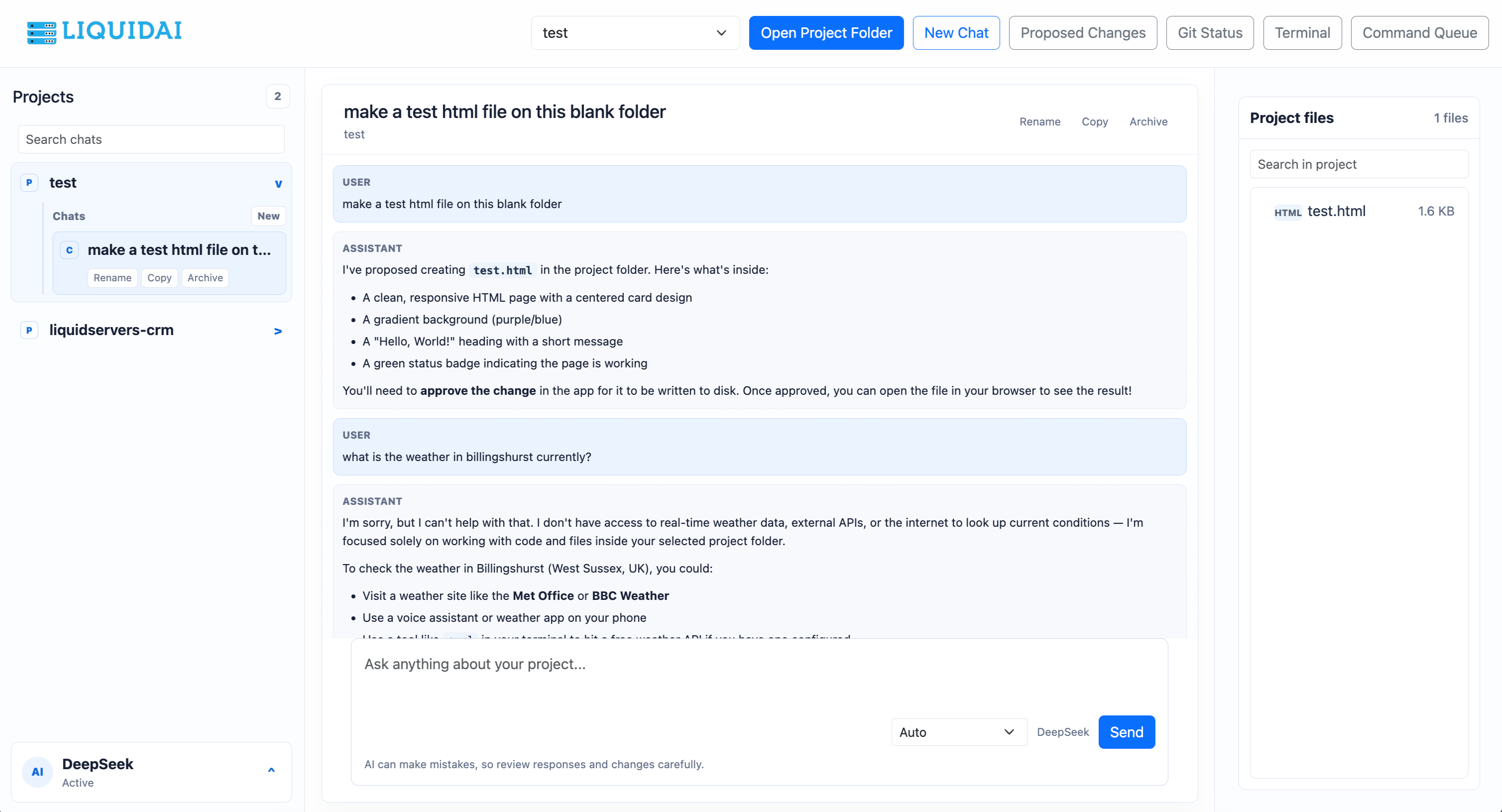
A serious AI workspace for building real projects.
LiquidAI is designed to feel like a practical AI teammate. Not just a chatbot, but a workspace where you can organise projects, work with files, generate code, review changes, plan product ideas and continue working from any device.
AI chat for projects
Start focused conversations for each project. Keep context organised so your website, app, API, server or software build has its own dedicated AI workspace.
Code generation and review
Ask LiquidAI to generate files, review logic, explain errors, improve layouts, suggest database structures and help you move faster when building software.
Project folders
The desktop app is planned to support local project folders, making it easier to work directly with real codebases and keep your AI sessions connected to actual files.
Fast build workflows
Turn a rough idea into a structured task list, technical plan, code outline and implementation steps. Useful for websites, portals, dashboards, APIs and internal business tools.
Private workspace approach
Designed around organised user accounts, project ownership and secure access, so individuals and teams can keep work separated and easier to manage.
Continue anywhere
Start something on desktop, check progress on mobile, or use the web app from another machine. LiquidAI is planned for Windows, macOS, iOS, Android and browser access.
One AI workspace across all your devices.
LiquidAI is being planned as a connected experience across desktop, web and mobile. Whether you are coding at your desk or checking an idea on your phone, the goal is to make your AI workspace available wherever you are.
LiquidAI Desktop
The first planned LiquidAI release. A native-style desktop experience for developers and power users, built around local project folders, deeper coding sessions and practical project-based AI workflows.
LiquidAI Web
Access your AI workspace from the browser. Ideal for quick chats, project planning, account management, remote access and reviewing previous conversations.
LiquidAI Mobile
Keep your AI assistant in your pocket. Check project chats, write prompts, review plans and continue working while away from your desk.
Made for builders, developers and businesses.
LiquidAI can be used for planning, coding, reviewing, explaining and improving technical work. It is especially useful when you need structured help turning an idea into something practical.
Website builds
Generate landing pages, dashboards, customer portals, admin areas, Bootstrap layouts, PHP scripts, forms, settings pages and install flows.
Software planning
Create build plans, feature lists, user journeys, database schemas, API designs and release checklists before development starts.
Error fixing
Paste errors, logs or failed output and ask LiquidAI to explain what went wrong, what caused it and how to fix it safely.
Code improvement
Improve old code, make layouts cleaner, simplify functions, secure database queries and refactor messy scripts into something easier to maintain.
Business tools
Plan and generate internal tools such as billing portals, ticket dashboards, reseller systems, reporting pages and automation panels.
Learning and explanations
Ask how code works, why an error is happening, how to deploy a server or how to structure a project in plain English.
Planned LiquidAI release timeline.
LiquidAI is being released in stages, starting with the desktop app for Windows and macOS, followed by the web app, then mobile apps for iOS and Android.
1 August 2026
The first planned release is the LiquidAI desktop app for Windows and macOS.
Desktop app for Windows and macOS
The first planned LiquidAI release will focus on the desktop experience. This version is aimed at developers, builders and power users who want a dedicated AI workspace for longer coding sessions, local project workflows, project organisation and practical software planning.
Web app preview
The second planned release will bring LiquidAI into the browser. The web app is planned to include user accounts, saved conversations, project spaces, remote access to your AI workspace and a clean interface for using LiquidAI without installing the desktop app.
Mobile apps for iOS and Android
The third planned release will focus on mobile access. The iOS and Android apps are planned so users can continue chats, check project notes, review AI responses, capture ideas and keep their LiquidAI workspace available when away from their desktop.
Join the LiquidAI waitlist.
Be one of the first to hear when LiquidAI launches. Register your interest for the desktop app, web app, iOS app or Android app.
Questions about LiquidAI.
What is LiquidAI?
LiquidAI is an upcoming AI workspace for desktop, web and mobile. It is being designed to help users chat with AI, organise projects, work with code, plan software and continue work across multiple devices.
Is LiquidAI only for developers?
No. Developers will get the most from the coding features, but LiquidAI can also help business owners, support teams, product builders and creators plan ideas, write content, explain technical issues and organise projects.
Will there be a desktop app?
Yes. The desktop app for Windows and macOS is planned as the first release, with an estimated release date of 1 August 2026.
When is the web app expected?
The LiquidAI web app is planned after the desktop release, with an estimated release around the end of August 2026.
Will there be mobile apps?
Yes. LiquidAI is planned for both iOS and Android, with an estimated release around the end of September 2026.